Uncategorised
- Details
- Written by: admin
- Category: Uncategorised
- Hits: 143
VirtueMart Update Key Manager
Complete administrator, store-owner, and extension-author documentation for protected purchases, private Joomla updates, expiring licences, and renewal reminders.
Version 1.2.2 Joomla 5 & 6 VirtueMart English & Slovenian UI
Author: Darko Fatur ·
1. Product overview
VirtueMart Update Key Manager supports both licensed Joomla extension packages and ordinary protected digital files. Once an order enters a configured paid status, it sends the buyer a protected purchase link extension products also receive a time-limited key for automatic Joomla updates.
Files are served from the VirtueMart Safe Path, outside the public web root. Purchase downloads have a configurable limit. A single-file product such as a JPEG or PDF is limited only by that count. Extension updates have no download-count limit while the licence is active, but automatic-update access can be restricted to a custom number of site domains.
Main capabilities
- One cryptographically random 256-bit update key for each licensed paid order item.
- SHA-256-only key storage: the database does not retain the recoverable full key.
- Automatic updates can be limited to a custom number of site domains: unlimited, one domain, three domains, or another configured limit.
- Limited initial package downloads with no update-download count limit while the licence remains active.
- Protected packages kept below the VirtueMart Safe Path rather than at public URLs.
- Automatic discovery of the highest strict semantic version (
MAJOR.MINOR.PATCH). - Static public Joomla update XML generation with exact SHA-256 package checksums.
- Administrator search, audit counters, revocation, reactivation, deletion, and immediate feed publishing.
- Scheduled expiry reminders with unique, product-restricted VirtueMart coupons.
- English (
en-GB) and Slovenian (sl-SI) language files.
1. Paid VirtueMart order
2. Key and licence issued
3. Buyer receives private link
4. Joomla detects public XML
5. Key authorizes ZIP stream
Important licence behavior
- A key belongs to one order item and therefore one configured product/package mapping.
- Repeated payment callbacks are idempotent: the unique order-item constraint prevents duplicate licences.
- Buying again creates a new order, key, and term. It does not extend or change the old licence.
- Revoked or expired licences cannot use purchase links or automatic updates.
- The key is shown in the original licence email only. Administrators see only its ending hint.
2. Installed architecture
| Extension | Identifier | Responsibility |
|---|---|---|
| Component | com_vmupdatekeymanager |
Licence database and administrator list; purchase/update download endpoint; dynamic feed endpoint; static feed publishing service; component options. |
| VirtueMart custom-field plugin | plg_vmcustom_vmupdatekeymanager |
Product mapping, version display, paid-order processing, storage creation, licence issuance, customer email, protected order-detail link, and renewal-term snapshot. |
| Installer plugin | plg_installer_vmupdatekeymanagerupdatekey |
Adds this manager's saved key only to protected manager-package downloads from shop.topoweryou.com. |
| Scheduled Tasks plugin | plg_task_vmupdatekeymanagerrenewal |
Runs renewal reminders/coupon creation and publishes all configured static update XML files. |
The parent package installs all four children, enables all three plugins, creates required database structure, migrates older installations, updates the manager update-site URL, and creates the two daily scheduled tasks if they do not already exist.
Install the parent package only. Do not install child ZIP files individually. Child uninstall is blocked by the package manifest.
3. Requirements and preparation
- Joomla 5 or Joomla 6. The package preflight rejects other major versions.
- A functioning VirtueMart store with a correctly configured Safe Path.
- MySQL-compatible database support used by Joomla/VirtueMart.
- Working Joomla outbound email configuration.
- PHP/web-server permission to create and read protected directories.
- PHP/web-server permission to write the configured public XML directory.
- A functioning Joomla Scheduled Tasks runner: Lazy Scheduler, Web Cron, or server cron/CLI.
- VirtueMart coupon support enabled if renewal reminders and discounts are used.
Before production
- Test installation, email delivery, purchase downloads, update discovery, and update installation on staging.
- Back up the Joomla database and site files.
- Confirm the Safe Path is outside
public_htmlor the equivalent document root. - Confirm that security/CDN services allow non-browser Joomla clients to read XML and reach the download endpoint.
4. Build and installation
Build from this source repository
./build.shThe build creates the installable parent package:
dist/pkg_vmupdatekeymanager_v1.2.2.zipThe build also prepares dist/updatesxml/vmupdatekeymanager.xml. It checks expected versions and, when xmllint is installed, validates relevant manifests/XML.
Install in Joomla
- Open System → Install → Extensions.
- Upload
pkg_vmupdatekeymanager_v1.2.2.zip. - Verify the component and three plugins appear in Joomla's extensions list.
- Open System → Manage → Plugins and verify all three plugins are enabled. The installer enables them automatically.
- Open System → Scheduled Tasks and verify the renewal and feed-publishing tasks exist, are published, and default to a 24-hour interval.
Upgrade
Install the newer parent package over the existing installation, or use Joomla Update after saving a valid manager update key in the component options. Installation migrations preserve licence rows and add missing columns. Always back up first and test the resulting scheduled tasks and feed.
Do not rename a released ZIP after publishing its XML: the XML checksum and filename must describe the exact bytes offered to customers.
5. Protected storage
Configure VirtueMart's Safe Path outside the public web root. A typical layout is:
/home/ACCOUNT/domains/shop.example.com/vmfiles/
└── salefiles/
    ├── route-calculation/
    │   ├── pkg_route_calculation_help_for_accounting_v1.6.1.zip
    │   └── pkg_route_calculation_help_for_accounting_v1.7.0.zip
    ├── accounting-tools/
    │   └── pkg_accounting_tools_v2.0.0.zip
    └── vmupdatekeymanager/
        └── pkg_vmupdatekeymanager_v1.2.2.zip
The component installer creates the default salefiles directory when the Safe Path resolves. The custom-field plugin creates each extension subdirectory when required. Upload the first matching release before accepting payment.
Naming rules
| Item | Rule | Example |
|---|---|---|
| Protected base folder | Lowercase ASCII letter/number first, then lowercase letters, numbers, hyphen, underscore. | salefiles |
| Extension folder | Same rule; permanent identifier for the product. | route-calculation |
| Package prefix | Starts with pkg_, ends with _v; middle permits letters, numbers, dot, hyphen, underscore. |
pkg_route_calculation_v |
| Version | Exactly three numeric semantic-version parts. | 1.7.0 |
| ZIP filename | PACKAGE_PREFIX + MAJOR.MINOR.PATCH.zip. |
pkg_route_calculation_v1.7.0.zip |
| Update XML filename | Lowercase letters/numbers/hyphens/underscores, ending in .xml. |
route-calculation.xml |
Keep old release ZIPs for as long as buyers must be able to use the initial purchase link captured at checkout. Automatic updates may use the newest matching version, but purchase links stay tied to the originally issued filename.
6. Configuration reference
Component options
Open Components → VirtueMart Update Key Manager → Options.
| Option | Default | Purpose |
|---|---|---|
| Update key | Empty | The key received when this manager was purchased. The installer plugin adds it only to matching manager downloads from the official host. |
| Public XML directory | files/updatesxml |
Path relative to the Joomla root. Every segment must match the lowercase directory naming rule and the resolved destination must remain inside the Joomla root. |
| Public XML base URL | https://shop.topoweryou.com/files/updatesxml |
Public URL corresponding to the directory. Its scheme/host also determines generated download URLs. |
| Permissions | Inherited | core.manage, core.edit.state, core.delete, and core.admin. |
Global custom-field plugin options
Open System → Manage → Plugins → VirtueMart Update Key Manager.
| Option | Default / range | Meaning |
|---|---|---|
| Protected base folder | salefiles |
Directory created inside the VirtueMart Safe Path. |
| Paid statuses | C,S |
Comma-separated VirtueMart order status codes treated as paid. Configure these to match the store's actual payment workflow. |
| Maximum initial-package downloads | 3; 1–1000 | Limit for the protected purchase package. |
| Validity days | 365; 1–3650 | Licence term from issuance/payment processing. |
| Licence email subject/body | Translated defaults | Custom templates; leave empty to use language defaults. |
| Enable renewal reminder | No | Enables snapshotting and scheduled reminders for newly issued licences. |
| Days before expiration | 10; 1–365 | Start of the eligible reminder window. |
| Renewal discount | 10%; 0.01–100 | Percentage used for the generated Gift coupon. |
| Coupon validity | 30 days; 1–365 | Validity from coupon creation. |
| Renewal subject/body | Translated defaults | Custom renewal templates; leave empty for language defaults. |
Precedence: Joomla plugin values are defaults. Licence-plan values, especially the update-domain limit, are saved on each reusable VirtueMart custom field. Product-assignment fields (download type, protected folder, package prefix or exact filename, XML filename, and renewal URL) remain product-specific.
Email placeholders
| Template | Available placeholders |
|---|---|
| Licence email | {key}, {expires}, {product}, {order}, {download_url}, {download_limit} |
| Renewal email | {product}, {expires}, {coupon}, {renewal_url}, {coupon_expires}, {discount} |
Templates are converted to safe HTML: text is escaped, line breaks are preserved, and the download/renewal URL is made clickable.
7. Configure a licensed VirtueMart product
Create the reusable custom field
- Open VirtueMart → Products → Custom Fields and create a field.
- Set Custom Field Type to Plugin.
- Select VirtueMart Update Key Manager.
- Save or reload the field so its plugin parameters appear. In Update-domain licence plan, set Maximum update domains:
0for unlimited,1for one site, or a custom number such as3. - Publish it. Set Cart Attribute to Yes, Cart Input to No, and Administrator only to No.
- Use a shopper-facing title such as Current version and choose the desired VirtueMart display position.
- Save. Create separate reusable fields such as Updates – Unlimited, Updates – 1 site, and Updates – 3 sites, then assign the appropriate field to each product.
| Reusable custom field | Maximum update domains | Licence result |
|---|---|---|
| Updates – Unlimited | 0 |
No domain restriction |
| Updates – 1 site | 1 |
One registered site hostname |
| Updates – 3 sites | 3 |
Up to three registered site hostnames |
The package installer also corrects these flags on existing Update Key Manager fields because VirtueMart requires a cart attribute to call the order-display hooks. The plugin renders no product/cart selector.
Assign it to a product
Open the product's Custom Fields tab, add the reusable field once, and choose one of the two clearly separated download types.
Extension package
Download type: Extension package (ZIP + updates)
Protected product folder: route-calculation
Package prefix: pkg_route_calculation_help_for_accounting_v
Update XML filename: route-calculation.xml
Renewal product URL: (optional; blank uses this product's detail URL)
Single protected file
Download type: Single protected file (limited downloads)
Protected product folder: purchased-photos
Exact filename: landscape.jpeg
Package prefix: (leave empty)
Update XML filename: (leave empty)
Store the exact file at SAFE_PATH/base_folder/protected_product_folder/filename. A single-file purchase does not expire, does not publish an update feed, and remains available until its purchase-download count is used.
- No product ID or SKU mapping is required.
- Do not add conflicting Update Key Manager assignments to one product; issuance/publishing rejects conflicts.
- Each XML filename must be unique across extensions.
- Do not change permanent identifiers after keys and update sites have been distributed.
Upload and verify the first release
- Upload at least one matching ZIP to
SAFE_PATH/base_folder/extension_folder/. - Open the product page. The field should display the highest matching version, such as
v1.6.1. - Run Publish update XML files from the component.
- Open the resulting public XML URL and confirm it is XML, not an HTML error/challenge.
If no matching ZIP exists when a paid order is handled, the attempted licence is not retained and no licence email is sent. A later paid-status callback can retry safely after the ZIP is uploaded.
8. Customer and licence lifecycle
Issuance
- VirtueMart changes an order to a configured paid status.
- The plugin checks each order item for a valid Update Key Manager product assignment.
- It validates the billing email, storage mapping, and either the latest matching extension release or the exact configured file.
- It generates a 32-byte random key (256 bits), stores its SHA-256 hash and a short ending hint, and snapshots the licence/renewal terms.
- It emails the protected purchase URL and download limit. Extension products also include the update key and expiry.
- If email sending fails, the new licence row is rolled back so a later callback can retry.
Initial purchase download
The buyer may use either the emailed key URL or the link shown in VirtueMart order details. The order-details link uses a 64-character HMAC token derived from the licence, order item, file, Joomla secret, and VirtueMart order password; it does not reveal the update key.
The endpoint verifies status, exact originally issued filename, storage containment/readability, and remaining count. Extension purchases also enforce licence expiry; single-file purchases are limited by download count and optional administrator revocation. It increments purchase_download_count atomically and records last_used_on.
Automatic Joomla update
- Joomla reads the public update XML and detects a newer version.
- The extension-specific installer plugin adds
key=…and the current Joomla site'sdomain=…. - The shop hashes the submitted key and finds the licence.
- The endpoint validates active/not-expired state, registers or recognizes the domain within the licence limit, and ensures the requested ZIP matches the licence's package prefix plus a semantic version.
- It streams the private ZIP, increments the update counter, and updates last-use time.
Update downloads do not consume the initial-purchase limit.
A domain limit of 0 remains backward-compatible and unlimited. Limited licences require the current installer key plugin; an older client that does not report its domain is rejected without consuming an activation.
9. Administrator operations
Open Components → VirtueMart Update Key Manager. The list supports search by customer email, order number, product name, product SKU, and key hint. Sortable fields include email, order, product, expiry, reminder date, purchase/update counts, and status.
Visible audit data
- Customer email, order number, product name and SKU.
- Key ending (never the full key), expiration date, active/revoked state.
- Renewal coupon and reminder-sent date.
- Purchase download count versus limit, automatic update count, and the editable registered update domains versus each licence's editable limit.
Toolbar actions
| Action | Permission | Effect |
|---|---|---|
| Activate | core.edit.state |
Clears revoked status. It does not extend an expired date or reset counters. |
| Revoke | core.edit.state |
Immediately blocks both purchase and update downloads. |
| Save domains | core.edit.state |
Saves the limit and registered hostname list for selected licences. Enter 0 for unlimited. Hostnames are normalized to lowercase, duplicates are removed, and the number of hostnames cannot exceed the limit. |
| Reset domains | core.edit.state |
Removes registered domains for the selected keys so legitimate replacement sites can activate. |
| Delete | core.delete |
Permanently deletes selected licence rows and manager-created renewal coupons whose stored ID/code match. |
| Publish update XML files | core.admin |
Processes all valid published product assignments immediately and reports rewritten, unchanged, and failed feeds. |
| Options | core.admin |
Opens component update-key, publishing, and ACL settings. |
For a limited licence, edit one hostname per line in the Registered domains field, select that licence's checkbox, and click Save domains. Existing unchanged domains retain their first-use and last-use timestamps. Changing the limit to 0 makes the licence unlimited and clears its stored registrations.
Delete is irreversible. It removes the licence record and its associated renewal coupon; the customer loses authorization. Use Revoke when temporary or reversible blocking is intended.
10. Publish automatic updates
Recommended static-feed workflow
- Build the exact release ZIP using the permanent package prefix and a strict semantic version.
- Upload it alongside older versions in the protected extension directory.
- Open the component and click Publish update XML files, or allow the daily task to run.
- Open the public XML and verify version, protected download URL, and SHA-256 checksum.
- On a staging customer site, clear Joomla's update cache, discover updates, and install using a valid key.
What the publisher does
- Reads every published Update Key Manager product assignment.
- Resolves its XML filename. A blank value reuses existing XML matching the package element or creates
extension-folder.xml; the manager preservesvmupdatekeymanager.xmlcompatibility. - Rejects conflicting extension-folder mappings or duplicate XML filenames.
- Finds the highest matching semantic-version ZIP.
- Computes SHA-256 from that exact file.
- Builds Joomla update XML for a package targeting Joomla
(5|6)\..*. - Writes atomically under the configured directory. Unchanged content is not unnecessarily replaced.
URLs
Recommended public static feed:
https://shop.example.com/files/updatesxml/route-calculation.xmlProtected update download generated in that XML:
https://shop.example.com/index.php?option=com_vmupdatekeymanager&task=download.get&file=pkg_route_calculation_v1.7.0.zip&channel=updateA dynamic feed endpoint also exists and selects the current package at request time:
https://shop.example.com/index.php?option=com_vmupdatekeymanager&task=updatefeed.get&extension=route-calculationStatic feeds are recommended for reliability, caching, predictable public availability, and easier firewall/CDN handling.
Optional repository publishing helper
For the manager's repository-generated XML only:
./publish-update-xml.sh USER@HOST:/ABSOLUTE/PUBLIC/PATH/files/updatesxml/

# Or use a local target / environment setting
VMUKM_XML_UPLOAD_TARGET=/path/to/files/updatesxml ./publish-update-xml.sh12. Renewal reminders and coupons
Enable and schedule
- Enable coupon usage in VirtueMart.
- Configure global/custom-field renewal defaults.
- Set an optional per-product Renewal product URL; blank generates that product's VirtueMart detail URL.
- Verify VirtueMart update-key renewal reminders is published in System → Scheduled Tasks.
- Ensure a real scheduler runner invokes Joomla tasks.
Eligibility and behavior
The task selects non-revoked, non-expired licences with stored renewal parameters, no successful reminder date, and an expiry within the snapshotted reminder window. Settings are frozen when the licence is issued so later offer changes do not retroactively alter sold terms.
- Code format:
RENEW-XXXXXXXX, generated from cryptographically random bytes. - Type: percentage Gift coupon, one attempt/use per customer.
- Scope: restricted to the licensed product.
- Registered buyer: also restricted to the original Joomla user.
- Guest buyer: not shopper-bound, but remains random, product-restricted, expiring, and one-use.
Failure and retry
If email fails, renewal_reminder_sent_on remains empty. A still-valid stored coupon is reused on the next run. If that unsent coupon expires, the task unpublishes it and creates a replacement. A successful paid renewal order using the manager-created code unpublishes that coupon. Deleting a licence through the component deletes its matching coupon.
Licences created before renewal parameters were introduced do not automatically gain reminders. New purchases create new licences with current snapshot data.
13. Security model
| Control | Protection |
|---|---|
| Random key | 32 bytes from a cryptographically secure generator (256 bits). |
| Database storage | Only SHA-256 hash and short key hint are retained. |
| Order link | HMAC token binds licence, order item, original file, Joomla secret, and VirtueMart order password. |
| Path validation | Strict names, realpath containment beneath Safe Path, direct-child file check, readability/file checks, and basename handling. |
| Package authorization | Purchase channel permits only the recorded original filename; update channel permits only the licence prefix plus a strict semantic version. |
| Licence state | Every download checks existence, expiry, and revoked status. |
| Initial limit | Database update increments only while count remains below the limit, preventing simple concurrent overuse. |
| Response headers | ZIP content type, attachment disposition, private/no-store cache control, and X-Content-Type-Options: nosniff. |
| Admin actions | CSRF token and Joomla ACL checks. |
| Feed integrity | SHA-256 is calculated from the exact protected release and XML is replaced atomically. |
| Key injection | The bundled manager installer plugin limits injection to official matching manager downloads. |
Deployment hardening
- Keep the Safe Path outside the web root and deny direct HTTP access.
- Grant only the required filesystem owner/group access; do not use world-writable permissions.
- Use HTTPS for the store, XML base URL, purchase links, and update endpoint.
- Treat emailed keys as credentials. Never place them in public logs, source control, tickets, or screenshots.
- Restrict component permissions to trusted administrator groups.
- Back up the licence table and Joomla secret consistently; changing the secret invalidates existing HMAC order-detail URLs.
- Exclude only the public XML directory and exact download route from JavaScript challenges—not from normal web/application security controls.
14. Routine operations
For every release
- Update package/child manifest versions and release notes as appropriate.
- Build the final ZIP once.
- Verify its name exactly matches the configured prefix and semantic version.
- Upload that unchanged ZIP into protected storage.
- Publish feeds immediately or monitor the scheduled publishing task.
- Confirm the public XML version and independently compare SHA-256.
- Test update discovery and installation with a valid staging licence.
- Test that invalid, expired, or revoked credentials fail.
Daily/weekly monitoring
- Review Scheduled Tasks history for renewal and feed-publishing failures.
- Check Joomla/PHP logs for storage, mapping, checksum, feed write, or mail errors.
- Review unexpectedly high purchase/update counters and last-use activity.
- Confirm public XML endpoints return HTTP success and XML content without a challenge page.
- Review expiring licences, unsent reminders, and coupon behavior.
Firewall/CDN/hosting
Automated Joomla clients cannot solve JavaScript challenges. Allow direct machine access to:
/files/updatesxml/
/index.php?option=com_vmupdatekeymanager&task=download.get
The endpoint still performs licence validation. Removing a browser challenge does not make ZIP files public.
15. Troubleshooting
| Symptom | Likely cause | Resolution |
|---|---|---|
| No licence/email after payment | Status not in paid list; invalid billing email; missing/conflicting product mapping; no matching ZIP or exact file; mail failure. | Confirm the actual order status code, assignment, file naming/storage, and Joomla mail. Correct it, then cause a safe paid-status callback/retry. |
| Product version is absent | No readable matching strict semantic-version ZIP or invalid field mapping. | Check Safe Path, base/extension folders, prefix, filename, permissions, and published field. |
| Purchase link says forbidden/limit reached | Expired/revoked licence, bad key/token, wrong file/channel, or consumed limit. | Check licence status/expiry/count in the component and use the original link/file. Reactivation does not reset the count. |
| Package/file not found | The recorded purchase file was removed/renamed or filesystem access changed. | Restore the exact original file to the recorded protected folder and correct owner/group/read permissions. |
| Joomla sees no update | Manifest update server wrong; XML stale; cache; feed returns HTML/challenge; version not newer. | Publish feeds, open XML directly, clear update cache, confirm target/version, and whitelist machine access. |
| Update detected but download fails | Key absent/invalid/expired/revoked; host/installer plugin mismatch; package mapping mismatch. | Save the correct key, enable/configure the sold extension's installer plugin, and verify host/prefix/filename. |
| Feed publishing reports conflict | Same extension folder has different mappings, or one XML filename is assigned to multiple extensions. | Make assignments unique and consistent; use one permanent prefix per extension. |
| Feed directory error | Invalid directory segments, path outside Joomla root, absent/unwritable directory, or mismatched base URL. | Use a valid relative path such as files/updatesxml, create it, fix ownership, and set its exact public URL. |
| Checksum mismatch | ZIP changed after XML generation or wrong ZIP/XML deployed. | Re-upload the final exact ZIP, republish XML, and verify SHA-256 independently. |
| Renewal reminders never send | Old licence lacks snapshot; reminders disabled; outside window; task/runner inactive; mail error. | Inspect stored/licence timing, task status/history, scheduler runner, and mail logs. Test with a newly issued staging licence. |
| Coupon exists but reminder failed | Mail failed after coupon creation. | Fix mail and rerun. The task reuses the valid coupon or replaces it after expiry. |
| All issues / Bugs | GitHub | Please report all issues on GitHub. |
HTTP failure meanings
- 403: missing/invalid authorization, inactive licence, wrong package/channel, invalid order link, or purchase limit reached.
- 404: unknown dynamic feed/extension, no matching releases, or requested protected file missing/unreadable.
- 500: plugin/storage configuration problem, checksum failure, or server-side publishing/download error.
16. Backup, recovery, and uninstall
Back up
- The Joomla database, especially
#__vmupdatekeymanager_licenses, VirtueMart order/coupon tables, extension parameters, update sites, and scheduled tasks. - The full VirtueMart Safe Path release tree.
- The public update XML directory.
- Joomla
configuration.phpconsistently with the database because the Joomla secret participates in order-link HMAC validation.
The full customer keys cannot be reconstructed from the database hashes. A lost key must be recovered from the customer's original email or replaced through a new purchase/licence workflow.
Recovery validation
- Restore database, Joomla configuration, protected packages, and public XML together.
- Verify plugin/task enablement and filesystem ownership.
- Republish XML if paths/hosts changed.
- Test an existing order-detail link and a valid update key on staging.
Uninstall
Uninstall the parent package through Joomla. The component uninstall SQL drops #__vmupdatekeymanager_licenses, permanently removing licence/audit records. Treat uninstall as destructive and take a verified backup first. Protected package files and public XML may remain on disk and should be reviewed/removed manually only when no longer required.
17. Technical reference
Endpoints and parameters
| Purpose | Task | Parameters |
|---|---|---|
| Protected download | download.get |
file; channel=purchase|update; for updates key/dlid plus domain when limited; or for purchase links license + token. |
| Dynamic feed | updatefeed.get |
extension matching the configured extension folder. |
Licence database fields
| Area | Fields |
|---|---|
| Identity/security | id, license_hash, key_hint, revoked |
| Order/product | order_id, order_number, order_item_id (unique), virtuemart_product_id, product_sku, product_name, joomla_user_id, email |
| Package/storage | package_prefix, storage_folder, purchase_file |
| Usage/term | purchase_download_limit, purchase_download_count, domain_limit, download_count, created_on, expires_on, last_used_on |
| Renewal | renewal_params, renewal_coupon_id, renewal_coupon_code, renewal_coupon_expires_on, renewal_reminder_sent_on |
Registered hostnames and their first/last use timestamps are stored in #__vmupdatekeymanager_domains, with one unique row per licence and domain.
Scheduled task routines
vmupdatekeymanager.renewal— create/reuse coupons and send eligible renewal reminders.vmupdatekeymanager.publishfeed— publish all configured protected extension update XML files.
Audit counters
purchase_download_countcounts successful initial-package responses and is constrained bypurchase_download_limit.download_countcounts successful update-channel downloads and has no configured maximum while active.last_used_onrecords the most recent successful download of either channel.
18. Production checklists
Initial launch
- Backups completed and staging installation tested.
- Parent package installed; component and all plugins enabled.
- VirtueMart Safe Path outside public web root and readable by PHP.
- Global paid statuses, term, download limit, and email templates reviewed.
- Reusable custom field correctly configured and assigned once per product.
- Permanent extension folder, prefix, and unique XML filename selected.
- First exact release ZIP uploaded to protected storage.
- Public XML directory writable and base URL correct.
- Both daily scheduled tasks published and scheduler runner functional.
- Mail delivery and VirtueMart coupon usage tested.
- Firewall/CDN permits direct XML and protected endpoint access.
- Paid staging order issues one email/key and a working limited link.
- Valid key updates successfully; invalid/revoked/expired key fails.
Release day
- Final package version and filename match the permanent prefix.
- Final ZIP uploaded unchanged to the correct protected folder.
- Feeds published with zero unexpected failures.
- Public XML version, filename, element, target, and SHA-256 verified.
- Joomla update cache cleared on staging and update discovered.
- Installation completed with a valid key and application smoke-tested.
- Older packages retained for outstanding purchase links.
- Details
- Written by: admin
- Category: Uncategorised
- Hits: 43
VirtueMart extension
VM Smart Filters
Help shoppers find products by colour, material, size, dimensions and weight.
Version 1.1.9 VirtueMart 4.8.0+ Joomla 4.4 / 5 / 6 PHP 8.1+
How the filters work
VM Smart Filters displays filters using the public custom fields assigned to your products. Shoppers select a value or enter a measurement range, and the page reloads with matching products.
Product attributes
Searchable String fields appear as selection lists for attributes such as colour, material and size.
Measurement ranges
Property fields provide minimum and maximum filters for length, width, height and weight.
Combined selections
Products must match every selected filter. For example, Colour: Blue and Size: Large returns products matching both.
1. Installation
Install VirtueMart first. Your site must meet the PHP requirements of its installed Joomla and VirtueMart versions, with PHP 8.1 as the extension minimum.
- Download the complete VM Smart Filters package from your purchase link.
- In Joomla, open System → Install → Extensions.
- Upload
pkg_vm_smartfilters_v1.1.9.zip. - Verify that System - VM Property Filters and Installer - VM Smart Filters Update Key are enabled under System → Manage → Plugins.
Install and update the complete package. It contains the site module, the property filtering plugin and the update key plugin.
2. Create searchable custom fields
Use VirtueMart’s String custom fields for text attributes such as Colour, Material and Size.
- Open VirtueMart → Products → Custom Fields.
- Create a field and select String (S) as its type.
- Enter a title such as Colour.
- Apply the settings below and save.
| Setting | Value |
|---|---|
| Custom Field Type | String (S) |
| Published | Yes |
| Searchable | Yes |
| Administrator only | No |
| Hidden | No |
| Field-level shopper-group restriction | None |
Assign values to products
Open a product’s Custom Fields tab, add your fields and enter their values. For example: Colour = Blue, Material = Plastic, Size = Medium. Save the product and ensure it is published and assigned to the category used for your demonstration.
Creating a custom field alone does not create filter options. Assign a value to at least one published product.
Use plain values such as Blue, Cotton or Large. Avoid the literal value 0 and values containing quotes, angle brackets or ampersands.
3. Publish the filtering module
- Open Content → Site Modules and select VM Smart Filters. Create a module of that type if needed.
- Set its status to Published.
- Choose a template position beside or above your product listing.
- Assign the module to your VirtueMart Category Layout menu item.
- Save and open the category on your website.
| Setting | Purpose |
|---|---|
| Orientation | Choose Vertical for a sidebar or Horizontal for a compact filter bar. |
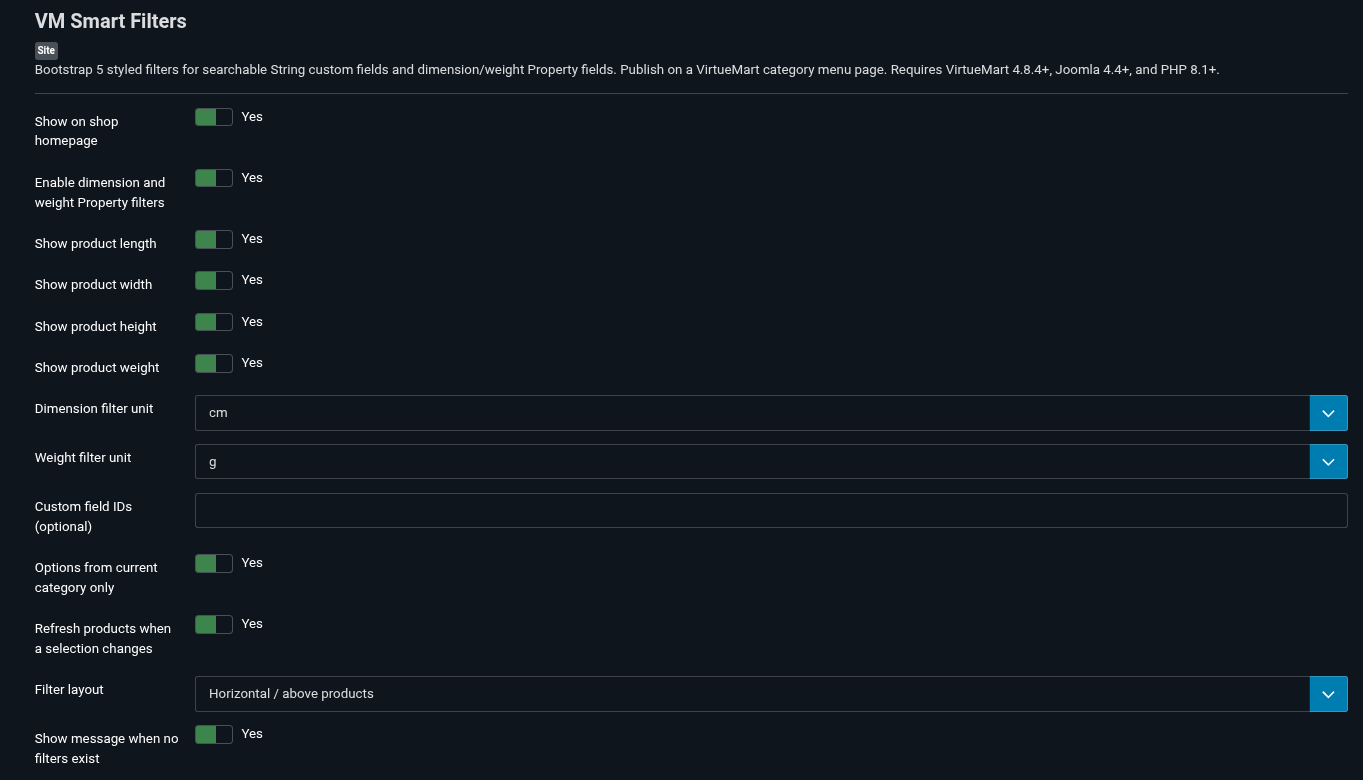
| Custom field IDs | Leave empty for automatic discovery, or enter a comma-separated list of field IDs to select the fields and their order. |
| Options from current category only | Enable for products directly assigned to the current category. Disable if the listing includes products from descendant categories. |
| Automatic submission | Refresh the listing automatically when a String value is selected. |
| Show on shop homepage | Enable to display filters on the VirtueMart shop homepage. |
Publish one filtering module per category page. The module displays on VirtueMart category views; it does not display on article or individual product detail pages.
4. Filter by dimensions and weight
- Enter each product’s measurements and units in its Product Dimensions and Weight tab.
- Create a published, public Property (P) custom field.
- Assign that field to the product and select one of the supported properties below.
- Enable dimension and weight Property filters in the module and choose which measurements to display.
- Choose the filter units. Shoppers can enter a minimum, maximum or both, then press Show products.
| Filter | Property value |
|---|---|
| Length | product_length |
| Width | product_width |
| Height | product_height |
| Weight | product_weight |
Property filters require both a measurement and the corresponding Property field assignment on the product. The Searchable flag is required for String filters only.
Units are converted automatically. A width range of 60–80 cm can match products stored as 70 cm, 0.7 m or 700 mm. Boundaries are inclusive.
Supported dimension units: mm, cm, m, in, ft, yd. Supported weight units: mg, g, kg, lb, oz. Zero or unfilled measurements are excluded when a range is active.
5. Example: Modular Storage Box
Modular Storage Box
A practical storage box for organising tools, accessories and everyday items at home, in the office or in your workshop.
| Attribute | Example value |
|---|---|
| Colour — String field | Blue |
| Material — String field | Plastic |
| Size — String field | Medium |
| Length | 40 cm |
| Width | 30 cm |
| Height | 25 cm |
| Weight | 1.2 kg |
Select Blue to demonstrate the colour filter. Combine it with Plastic, or enter a width range of 25–35 cm.
One product demonstrates the controls. To demonstrate how filtering narrows results, add more published products with different values.
6. Using and clearing filters
- Select one value per String field.
- Enter measurement ranges and press Show products.
- Use the × beside a selected filter to clear that filter.
- Use the Clear filters control to reset all selections.
Numeric ranges persist through sorting and pagination and reset when the category changes. Available options do not shrink after another filter is chosen, so some combinations may return no products.
7. Updates and your download key
Keep Installer - VM Smart Filters Update Key enabled. Open its settings under System → Manage → Plugins and paste the update key from your purchase email.
Alternatively, enter the key under System → Update Sites → VM Smart Filters Package Updates in the Download Key field.
The installer plugin sends your site hostname for licences with a site limit. Update access follows the validity and domain allowance of your purchase. Installed filters continue working after update access expires.
8. Troubleshooting
| Problem | What to check |
|---|---|
| The module is missing | Check publication, access, template position and menu assignment. Open a VirtueMart category view and verify that eligible products have public filter fields. |
| A String filter is missing | Check that the field is String, published, searchable and public, with values assigned to published products. |
| A measurement filter is missing | Assign its Property field to the product, enter measurements and units, and enable that measurement in the module. |
| No products match | Check the combined selections, category, manufacturer, keyword and direct product assignments. Clear filters and try one at a time. |
| Blue also matches Dark Blue | VirtueMart controls exact versus substring matching. For exact matching, configure strictCustomfieldTags=1 using your supported VirtueMart configuration workflow. |
| The update download fails | Check the update key, licence validity, domain allowance and whether the installer update key plugin is enabled. |
VM Smart Filters supports searchable String fields and Property filters for length, width, height and weight. Price, stock, plugin-backed custom fields and inherited child-product measurements are outside this version’s scope.
Module Administrator view:
- Details
- Written by: admin
- Category: Uncategorised
- Hits: 31
HeadTag Manager Documentation
Version 1.2.5
Add custom tags to your website's HTML head, on the pages you choose.
HeadTag Manager is designed for Joomla 5 and 6. Use it for Open Graph tags, link tags and structured data without editing your template.
See the demo below1. Install the package
- Download the HeadTag Manager installation ZIP from your purchase.
- In Joomla Administrator, open System → Install → Extensions.
- Upload the complete package, for example
pkg_headtagmanager_v1.2.5.zip. You do not need to extract it. - Open System → Manage → Plugins and check that System - HeadTag Manager is enabled.
The package installs the module, the head-output plugin and the update-key plugin together. The plugins are enabled automatically on a fresh installation.
2. Create your first module
- Open Content → Site Modules → New and select HeadTag Manager.
- Enter a title that helps you identify the tags, such as Home page sharing tags. Set Show Title to Hide.
- Set Position to
headtag-manager. If it is not listed, type the name and press Enter. - Paste your complete HTML tags into Custom head markup.
- Leave Insert into head set to Yes and set Status to Published.
- Choose the pages in Menu Assignment, then save the module.
No template changes are needed. The special position
headtag-manager is read by the plugin. The module adds tags inside <head> and does not display a content block on the page.3. Choose where the tags appear
Use the module's Menu Assignment tab:
- On all pages: apply the same tags wherever the module passes access, language, publishing and inheritance checks.
- Only on the pages selected: select the menu items that should receive the tags.
- On all pages except those selected: exclude specific menu items.
- No pages: keep the module without applying its tags.
Create separate HeadTag Manager instances when different pages need different tags. Joomla's access level, language and publishing dates also control when each instance applies.
Assignments follow the active Joomla menu item, not an exact URL. For category menu items, Include inherited pages defaults to No: tags stay on that category and its pagination. Set it to Yes to include articles and subcategories sharing the menu item. This restriction also applies to modules assigned to all pages. Automatic article tags are configured separately in the system plugin.
4. Example markup
Open Graph sharing tags
Copy this example into Custom head markup, then replace the title, description, page address and image address with your own values.
<meta property="og:title" content="My page title">
<meta property="og:description" content="A short description of this page.">
<meta property="og:type" content="website">
<meta property="og:url" content="https://example.com/my-page">
<meta property="og:image" content="https://example.com/images/share.jpg">
Use full public URLs for the page and image. For a title containing an ampersand, write Fish & Chips in the HTML attribute.
Structured data (JSON-LD)
This example describes an organization. Replace the example values and assign it to a suitable page.
<script type="application/ld+json">
{
  "@context": "https://schema.org",
  "@type": "Organization",
  "name": "My Business",
  "url": "https://example.com",
  "logo": "https://example.com/images/logo.png"
}
</script>
Paste only the tags you want to insert, without
<html> or <head> wrappers. Markup is inserted as entered, so only trusted administrators should edit it. PHP code and content-plugin shortcodes are not processed. Custom modules alone leave other tags untouched. Automatic article and menu tags use the duplicate policy configured in the system plugin.5. Check the result
- Open an assigned page on your website.
- Use your browser's View Page Source option.
- Search for a value you entered, such as
og:title, and confirm that it appears inside<head>. - Check an unassigned page to confirm that the same module's tags are absent.
Clear Joomla and any page/CDN caches after changing tags or assignments if the old markup is still shown.
6. Automatic article sharing tags
Open System → Manage → Plugins → System - HeadTag Manager and enable Automatic article Open Graph. No module is needed. Remove the old Open Graph block from your article template override. Optionally enter your own Facebook App ID.
Under Article sharing options you can select categories and include descendants, enable image fallbacks (intro image, full image, default image), choose the description source and word-boundary length limit, and preserve existing tags or replace them with generated values.
Automatic article Open Graph is off by default. When enabled, it generates og:title, og:description, og:image, og:type and the absolute article URL in og:url. Empty descriptions and unavailable images are omitted. It runs on individual article pages, independently of module menu assignments.
| Option | Default and behavior |
|---|---|
| Article categories | Empty means all categories. Select categories to restrict automatic tags. Include subcategories is off by default. |
| Image fallbacks | Off by default. When enabled, try the intro image, full article image, then the configured default sharing image. A valid custom-field image takes priority. |
| Description source | Intro text by default. You can instead use the article meta description alone, or the meta description with intro-text fallback. |
| Description length | Zero means unlimited. A positive character limit stops at a word boundary. A single word longer than the limit is kept intact. |
| Existing sharing tags | Preserve existing values by default. Replace with generated values uses the article's generated metadata instead. |
| Article custom fields | Off by default. Configure separate field IDs for social title, description and image; zero disables an individual override. |
| Site name and locale | Off by default. When enabled, blank overrides use Joomla's site name and the current page language. |
| Publication and modification dates | Off by default. Uses ISO 8601 dates; publication falls back to creation, and unset modification dates are omitted. |
| Twitter Card tags | Off by default. Choose summary or large-image summary and optionally enter an account handle. Without an image, the card uses summary. |
| Facebook App ID | Blank by default. Enter your own numeric ID to add fb:app_id. |
For article overrides, create text, textarea and media/URL fields in Content → Fields, set their Automatic Display to Do not automatically display, enable Use article custom fields and enter their numeric IDs in the plugin. Fill in the fields on each article. Empty values fall back to article data. Joomla field publication, language and access rules apply.
Site name, locale, publication/modification dates and Twitter Card tags have separate optional switches. Existing settings are preserved; new optional features default to off.
Duplicate handling covers the rendered page head, including template and module tags, only for names generated on this article. Preserve keeps the first existing value; Replace uses the generated value. Extra duplicates of managed names are removed. Order this plugin after other tag-writing plugins and before page-cache plugins that save the response, then clear caches and check the output.
7. Automatic sharing tags for menu pages
- Open System - HeadTag Manager → Menu sharing options.
- Enable Automatic menu Open Graph; it is off by default.
- Choose Selected menu items and select the pages, or choose All menu pages. An empty selection means no pages.
- Under Individual menu images, add rows to assign pictures to menu items as described below.
- Optionally choose a shared fallback under Menu sharing image, then save and clear caches.
Matching non-article component pages receive the page title (menu title fallback), page meta description (menu description fallback), og:type=website and an absolute menu URL. Empty descriptions and unset images are omitted. Add a meta description in the menu or component settings when needed. Pagination shares the menu landing-page URL.
Assign one picture to multiple menu items
- Under Individual menu images, add a row.
- In that row's Menu items selector, choose one or more menu items.
- Choose the Sharing picture for those menu items.
- Add another row, select another group of menu items and choose its picture. Repeat as needed.
- Save, clear Joomla/page/CDN caches, and check a page from each group using View Page Source or the preview tool.
For example, select Home and About in the first row with your company picture, then select Services and Contact in a second row with another picture. You can also select just one menu item for a picture used only on that page. Existing single-menu selections remain supported after upgrading.
Image rows only choose pictures: pages must also be enabled by Menu scope and, when using Selected menu items, the main Menu items selection. For aliases, select the resolved target menu item.
If a menu item appears in several rows, its first matching row with a valid picture wins. Blank or invalid pictures are skipped. If no matching row has a valid picture, the plugin uses Menu sharing image as the shared fallback. Leave that fallback blank to generate no image for pages without a valid row picture. The chosen picture also supplies the Twitter Card image when Twitter Cards are enabled.
Keep or replace existing sharing images
Under Article sharing options → Existing sharing tags, choose how generated tags interact with existing tags. This policy also applies to automatic menu tags:
- Preserve existing values: keep the first existing
og:imagefrom a template, module or another extension. Use the configured picture when that tag is absent. - Replace with generated values: use the picture selected from the image rows or shared fallback instead of an existing
og:image.
Existing Open Graph and Twitter images are handled independently. If no valid picture is generated, existing image tags remain unchanged. The plugin does not scan menu-page content for images. Individual articles continue to use their separate article image and fallback settings.
Description length, existing-tag policy, site name, locale, Facebook App ID and Twitter Card settings also apply. These shared controls remain in the basic/article settings. Article-specific custom fields, image fallbacks, description source and dates do not apply to menu pages.
Individual articles still use Automatic article Open Graph and Article categories. Selecting a category menu does not enable its tags on inherited articles or subcategories. External links, headings, separators, edit forms and component actions are excluded. For menu aliases, select the resolved target menu item. Check third-party component routes using the preview tool.
8. Preview tags and diagnose duplicates
Open your Joomla site URL followed by /media/plg_system_headtagmanager/preview.html, keep any Joomla subdirectory in that URL, paste the complete rendered page source and click Inspect tags. The tool shows a text preview, tag values and warnings locally in your browser, without uploading source or fetching images.
The preview also reports why automatic menu tags were generated or skipped. To see generated candidates and their sources, enable Include tag diagnostics in the plugin, clear caches and copy fresh page source. Diagnostic data is public in the source. Disable it after checking and clear caches again. Existing raw tags can be identified as page-head tags, but their originating extension cannot be identified automatically.
9. Set up purchased updates
- Open System → Manage → Plugins.
- Find Installer - HeadTag Manager Update Key and check that it is enabled.
- Paste the update key received with your purchase into Update key and save.
- Use System → Update → Extensions to find and install available updates.
The key is used for protected update downloads. No key is needed to install, configure or run the module. If your update entitlement expires, your existing tags continue to work.
During a protected update download, the update plugin sends the key and your site's hostname to shop.topoweryou.com to validate the update entitlement and any update-domain limit. It does not make these requests during frontend page rendering. You do not need VirtueMart or VM Key Manager installed on your website.
Troubleshooting
| Issue | What to check |
|---|---|
| No custom module tags in the page source | Enable the system plugin, publish the module, set Insert into head to Yes, and use the exact position headtag-manager. Check menu assignment, access, language and publishing dates. |
| No automatic article tags | Enable Automatic article Open Graph in the system plugin, open an individual article, and check the selected categories and Include subcategories setting. No module instance is required. |
| No automatic menu tags | Enable Automatic menu Open Graph and check the menu scope and selected items. An empty selection means no pages. Individual articles use the separate article controls. |
| Wrong picture on a menu page | Check the menu items selected in each image row and their order: the first matching valid picture wins. Check the shared Menu sharing image fallback and the Existing sharing tags policy; Preserve existing values can keep an image supplied elsewhere. Clear caches and inspect the page source. |
| Tags appear on unexpected pages | Check which menu item Joomla uses for those pages and review all published HeadTag Manager instances. |
| Duplicate tags | Check other module instances, your template and SEO extensions. For automatic article and menu tags, choose Preserve existing values or Replace with generated values. Duplicate cleanup only affects names generated for the current page. Use the preview tool to inspect other duplicates. |
| Old values still appear | Clear Joomla, page and CDN caches, then inspect the page source again. |
| An update cannot be downloaded | Check the installer plugin, saved key, entitlement expiry and update-domain allowance. Contact the seller if your site has moved to a new domain. |
Disable or uninstall
To stop a set of tags, unpublish its module or set Insert into head to No. To stop automatic article tags, set Automatic article Open Graph to No in the system plugin. To stop automatic menu tags, set Automatic menu Open Graph to No. Disable Include tag diagnostics separately if enabled, then clear caches. To remove the extension, first save any markup you want to keep, then open System → Manage → Extensions and uninstall the HeadTag Manager package.
Source code on GitHub
Browse the source code at Darko-F/HeadTag-Manager on GitHub. The repository includes the extension source and build tools. For the ready-to-install package and purchased updates, use your purchase download.
Feature demonstration
See how your sharing tags work
One picture for a page. One picture for a whole group. Different pictures for different sections.
The examples below illustrate settings and generated markup. The coloured panels stand in for your chosen photos; they are not fetched from your website. Social platforms control the final appearance of shared links.
1. Choose pictures for groups of menu items
In Menu sharing options → Individual menu images, add one row per picture. Each row lets you select multiple menu items.
| Image row | Selected menu items | Sharing picture |
|---|---|---|
| Row 1 | Home, About | Company picture |
| Row 2 | Services, Contact | Services picture |
| Shared fallback | Other eligible menu pages without a valid matching picture | Default brand picture |
Enable Automatic menu Open Graph and include the pages in your menu scope. Choosing a picture does not enable a page by itself. If groups overlap, the first matching row with a valid picture wins.
2. See illustrative sharing cards
Company picture
Example image area
Example image area
EXAMPLE.COM / ABOUT
Meet our company
Discover our team and the story behind our business.
Row 1: Home + AboutServices picture
Example image area
Example image area
EXAMPLE.COM / SERVICES
Explore our services
Find the right service for your next project.
Row 2: Services + ContactDefault brand picture
Example image area
Example image area
EXAMPLE.COM / FAQ
Frequently asked questions
Helpful answers to common questions about our business.
Shared fallbackThese are sample cards, not live previews. Pages in the same image group keep their own titles, descriptions and URLs. An existing sharing image may take priority when Preserve existing values is enabled.
3. Look at the generated markup
For the sample Services page, automatic menu tags could look like this. The image comes from Row 2; the title and description come from the page metadata, with menu settings as fallbacks.
View sample Open Graph tags
<meta property="og:title" content="Explore our services">
<meta property="og:description" content="Find the right service for your next project.">
<meta property="og:type" content="website">
<meta property="og:url" content="https://example.com/services">
<meta property="og:image" content="https://example.com/images/services.jpg">
View sample Twitter Card tags
Enable Twitter Card tags and select Large image summary to generate these additional tags. Existing Open Graph and Twitter values follow the duplicate policy independently.
<meta name="twitter:card" content="summary_large_image">
<meta name="twitter:title" content="Explore our services">
<meta name="twitter:description" content="Find the right service for your next project.">
<meta name="twitter:image" content="https://example.com/images/services.jpg">
4. Inspect this page's custom head module
This example uses a custom head module created with HeadTag Manager. Its demonstration tag is entered in the module's Custom head markup field, and the module is assigned to this documentation page's menu item. HeadTag Manager inserts that markup inside <head>, without displaying a module block in the article.
Try it on this documentation and demo page:
- Right-click the page and choose View Page Source in your browser.
- Use Find to search for
headtag-manager-demo. - Find the actual meta tag inside
<head>, before</head>. The escaped example in this article's body is only explanatory text. - Check that its content reads
Custom head module by topoweryou.com.
Expected module output:
<meta name="headtag-manager-demo" content="Custom head module by topoweryou.com">You can also open your browser's developer tools, select Elements (or Inspector), expand <head> and locate the same meta tag. It is a demonstration marker, not a visible page element or a social sharing tag.
This shows how a custom module can add a specific tag to an assigned page without editing the template. The same module field accepts your own meta tags, link tags and JSON-LD markup. To inspect sharing tags too, use the included preview tool described above.
If the marker is absent from the head, the demo module is not currently outputting it. The sample sharing cards above remain illustrations. Custom modules work on article pages too; automatic article sharing tags and automatic menu image groups have their own separate settings.
5. Inspect automatically generated article tags
This Joomla article can demonstrate automatic sharing tags alongside the custom module. When Automatic article Open Graph is enabled for its category, HeadTag Manager generates sharing metadata from the article's title, description source and image settings. No custom module is needed for those automatic tags.
- Open View Page Source, or expand
<head>in your browser's Elements / Inspector panel. - Find
og:titleand compare its value with this article's title, or its configured social-title override. - Find
og:type: the generated value for an individual article isarticle. - Inspect
og:description,og:urland, when a valid image is available,og:image. Empty descriptions and unavailable images are omitted. - If Twitter Cards are enabled, also look for
twitter:card,twitter:titleand the other generated Twitter tags.
Two features, one page: the headtag-manager-demo marker is manually entered in a custom HeadTag Manager module. The article sharing tags are generated automatically by the system plugin. Both can appear together inside the same HTML head.
Existing tags from your template or another extension may be retained when Preserve existing values is selected. A tag's presence alone does not identify which extension created it. When tag diagnostics are enabled, the preview tool can show HeadTag Manager's generated candidates, sources and duplicate-handling decisions.
Automatic tags appear only when the article feature is enabled and this article passes its category filter. See Automatic article sharing tags for setup. The menu image groups shown earlier apply to non-article menu pages; this article uses the article image settings.
Back to menu sharing setup View source on GitHubCopyright © 2026 topoweryou.com. Author: Darko Fatur.
HeadTag Manager is distributed under the GNU General Public License, version 2 or later. Purchased update-domain limits apply to the update service, not to installation or use of the module.